folk tales
flipping pages
2026-08-20
recently, Karl and i were brainstorming what board games might look like in the context of a physical computing environment. with the progress that Omar has made on general object tracking in folk, we were beginning to move past thinking in promisingly broad (but also vague) terms, and toward concrete questions about how it might work in practice. what would the interface look like? feel like? how would people interact with it?
there remains an incredible amount of work to be done in proving out the depths of physical computing in general. not just in terms of what we make with computers, but how we work with them.
a catalyzing lens through which to view this problem space is to think of computing as enchantment. start with the physical world. how do the digital and physical intertwine and integrate with one another? in what ways are they halves of the same whole?
our conversation wandered to the question of how to keep track of entities on the play field. similar to the debugging interface Omar had built, what if we had a page that dynamically displayed “portraits” of various characters/objects, as well as their status, in real-time?
this brought me to think about other ways people organize and keep track of entities in table-top games, like with guess who:

my mind then wandered to trading card games:
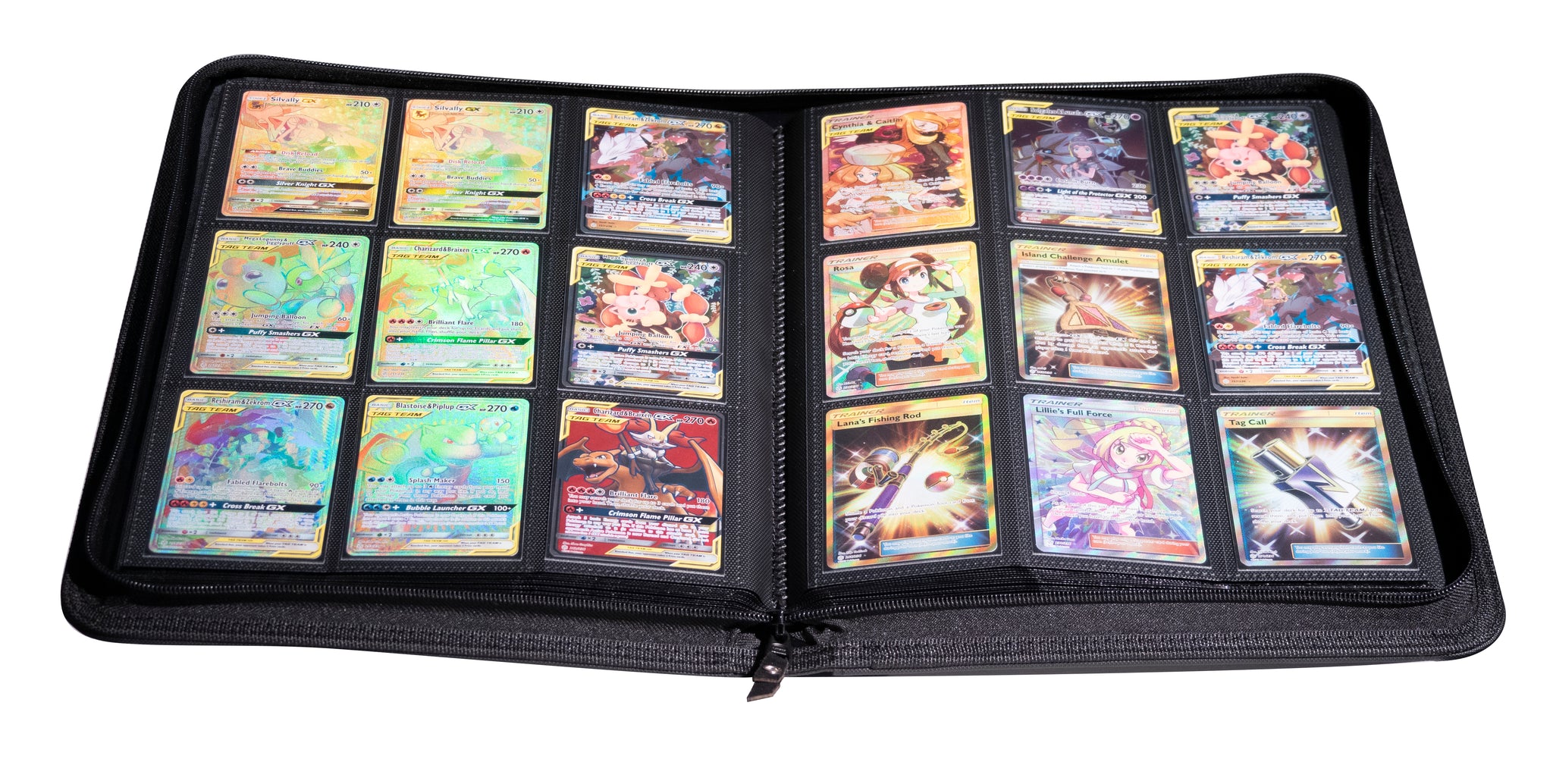
to stay organized, trading card game players often carry their cards in a binder—organizing their decks page-by-page, both for protection and ease of access. their cards are no longer a stack, but instead a book.
a book. what if flipping the pages of a book could actually control a dynamic interface?
initial experiments
a nuance about physical books that’s worth calling out is that they integrate content display and interaction surface into one coherent object. this is not something to take for granted in a digital context, so it’s worth interrogating the importance and value of this assumption.
in my first prototypes, the content view and interface controller were split out as two distinct mechanisms. this configuration could prove useful in scenarios where the content being displayed exceeds the bounds of the controller.
functional fixedness vs flexibility
something immediately interesting with these early iterations was the ease with which simple shifts in physical orientation could yield dramatically different feeling interactions. below, you can see the page controller used in two distinct modes: first in its intended use case, and in an alternative, touch-like configuration in the second, achieved by simply flipping the entire page on its back.
this flexibility extends to more fine-grained interactions as well. consider the differences between these two gestures:
both of these movements accomplish the same goal: breaking folk’s recognition of a program’s tracking tag, causing the logic associated with it to be run once more when the system again detects it. the feel of the interaction, however, differs entirely between these two examples. the former feels like a touch screen, while the latter feels like a motion-based gesture system.
this is the power and nuance of physical objects: they can be understood, used, and recontextualized via direct manipulation.the blank page
digital, material
these early iterations quickly highlighted some issues. first is the problem of using a single sheet of paper for the controller: trying to pick up and manipulate individual sheets of paper from a table can be somewhat cumbersome. this thinness can also make the interaction feel similarly ephemeral or abstract - it does not “sell” the physicality as much as some other forms and materials might be capable of.
physicality is not simply a pleasant nicety, but essential to grounding and teaching interaction logic to the end user. they suggest a certain method of interaction, while also providing physical anchors that allow for the building of muscle memory, the same way that physical controls in a car or on a pair of headphones might.
fitting the prototype to the form of a small notebook immediately improved the feel of the interaction.
this is what we mean when we say that a physical computing system gives us the “physical world for free”: we no longer need to create elaborate simulacra to emulate the richness of the real world, because we can simply use the genuine article.
there was still something that ultimately felt unconsidered about this iteration, however. as we discussed earlier, books work by integrating content and control into one object. in our prototypes up to this point, these two things have remained separate: the notebook’s pages are blank.
it’s entirely possible to imagine modified or entirely new book-esque form factors that lean more fully into functioning as a isolated, dedicated control. but in this scenario, the lack of content on the page made the interaction feel unfinished.
there’s something magical about seeing a program interact fluently with an object in the real world. after quickly testing what it might look like to display a program directly on the book’s pages, i knew i needed to integrate the view and controller into a single object.
this immediately felt “right,” making the interaction feel compelling in a way that prior iterations did not. this was compounded by the fact that, other than a set of 3 to 4 pages, the prototype remained entirely functional as a regular notebook — one that you can draw, doodle, and write in with regular pen, pencil, and marker. there were no embedded electronics to maintain, charge, or replace.
during the design and development process, i had kept the content shown limited to fairly simple debug information. this was useful for that process, but otherwise didn’t really do much in communicating the concept as much as actual content might. after all, a good demo should tell a story. people need to understand: what am i looking at? how is it different from what i am used to? and why should i care?demos
i settled on using my prototype to flip through the words of Mark Twain, from his A Tale of Two Cities: a familiar, storybook-like opening which could succinctly convey the mechanism. i added a gradual change in the background to help mark progress through the passage.
future directions

what if our dynamic book had different sections with their own unique behaviors and ways of displaying information?
how could our book “talk” to other things on the table?
what if there were ways to skim and skip through large amounts of content at speed (like riffling pages)?
hardware upgrades
2026-08-02
i decided to invest in some upgrades for my folk setup—chief among them a new, higher-resolution projector. 4k makes editing programs in-situ on the table much more viable.

i’ve tried to keep the physical configuration of my projector and camera straightforward and minimal in footprint. they’re secured to a quick-release plate, allowing for quick removal and reattachment. this assembly is then mounted directly onto a wood shelf with a metal bracket:

this removes the need for an overbearing photography stand or other similar equipment.
i faced some frustrations trying to find a way to keep my camera properly mounted to the projector. at first i used double-sided sticky tape, but it would start to peel off over time due to the camera’s weight.

i set to work creating a more permanent solution. i tried at first to see if i could get away a friction-fit “plug” into the small speaker grill to help keep the camera in place. it quickly became apparent that wouldn’t work.
after a few iterations, i ended up with a bracket that clipped into the back of the larger fan grill in order to hold the camera in place. this works pretty well, and the plastic teeth are short enough that they avoid rubbing against the fan.


improving calibration
2026-08-02

an issue i’ve run into somewhat frequently when trying to calibrate folk is the mismatch between the physical area covered by the projector and what the camera can see.
the calibration process involves fitting a set of projected AprilTags with their printed counterparts, where the array of projected tags fill the gaps between printed tags (and vice-versa).
a mismatch between the projector and camera can become a challenge because printed and projected tags must first be manually aligned to start the pose registration process. while folk does provide a simple slider control to adjust projected tag scale, it scales them relative to the top-left of the projector view, leading to situations where the projected tags fit the printed tags but are outside of the view of the camera.
improving the ux of this experience felt like a good way to familiarize myself with some of folk’s inner workings and get to grips with writing TCL. there was (and is) very much a learning curve here, especially coming from writing Rust in an embedded context. something at this size and scope would also be a good exercise in understanding the folk’s existing code and in crafting a specific, focused, relatively uncontentious PR.
my initial thought was to offer an additional set of sliders to control the X and Y position of the projected tag set. the calibration interface already has several sliders to allow the user to set things like camera exposure and tag scale, so reusing the pattern seemed like a natural fit.
but assuming that the center of the projection is more or less guaranteed to be in view of the camera in some form, we can avoid the complexity of added controls by simply centering the tags in the middle of the projected view. i settled on this approach instead.
understanding the code
model.folk provides a set of methods for instantiating and modifying sets of calibration tags, which it Claims as a library for other programs to access under modelLib. calibrate.folk uses these to create a unitless calibration pattern, unitModel.
we can then specify the actual physical size in meters for our projected tags, based on the printed tags that serve as our ground truth:
When camera /camera/ has width /cameraWidth/ height /cameraHeight/ &
     display /display/ has width /displayWidth/ height /displayHeight/ &
     the AprilTag detector maker is /makeAprilTagDetector/ &
     the jpeg library is /jpegLib/ &
     the calibration model library is /modelLib/ &
     the calibration matrix library is /matLib/ &
     /someone/ wishes to calibrate camera /camera/ to display /display/
         using measurements /measurements/ {

...

set printedSideLengthMm [string trimright $measurements(tagSideLength) mm]

...

set printedSideLengthM [/ $printedSideLengthMm 1000.0]
set baseModel [$modelLib scaleModel [$modelLib unitModel]  $printedSideLengthM]
we then compute a homography to map this set of tags into pixels on the projector plane:
Hold! -key H_modelToDisplay {
    # Default model and version: nothing rotated.
    Claim the calibration model-to-display homography is $H_modelToDisplay with
        model $baseModel version -1
        frameTimestamp [expr {[clock milliseconds] / 1000.0}]
        modelTimestamp [expr {[clock milliseconds] / 1000.0}]
}
this homography is computed using our mapping, H_modelToDisplay.
set H_modelToDisplay [$matLib estimateHomography [subst {
    {$printedSideLengthM $printedSideLengthM $tagSideLengthPixels $tagSideLengthPixels}
    {$printedSideLengthM 0 $tagSideLengthPixels 0}
    {0 $printedSideLengthM 0 $tagSideLengthPixels}
    {0 0 0 0}
}]]
by adding offsets to this mapping—
set H_modelToDisplay [$matLib estimateHomography [subst {
    {$printedSideLengthM $printedSideLengthM [expr {$tagSideLengthPixels + $xOffset}] [expr {$tagSideLengthPixels + $yOffset}]}
    {$printedSideLengthM 0 [expr {$tagSideLengthPixels + $xOffset}] $yOffset}
    {0 $printedSideLengthM $xOffset [expr {$tagSideLengthPixels + $yOffset}]}
    {0 0 $xOffset $yOffset}
}]]
we can then center our tag arrangement given the appropriate calculations (top-left coordinate system):
set projWidthPixels [expr {$COLS * ($tagSideLengthPixels * 10/6 + $pad)}]
set projWidthPixels [expr {$projWidthPixels * 1.1}]
set projHeightPixels [expr {$ROWS * ($tagSideLengthPixels * 10/6 + $pad)}]
set projHeightPixels [expr {$projHeightPixels * 1.1}]
set xOffset [expr {round(($displayWidth - $projWidthPixels) / 2)}]
set yOffset [expr {round(($displayHeight - $projHeightPixels) / 2)}]
there’s also scaling factors appended to the calibration pattern geometry to offset the labels dynamically appended to all four sides of the tag pattern. there isn’t a way to account for their size cleanly prior to setting the size scale of the pattern itself, so these were set mainly to ensure that the tags would all show up uncropped, even at the largest scale.
ultimately, what i found so interesting about this exercise was that the bulk of the work was not really writing code or thinking through an algorithm, but instead understanding what was already written with a reasonable amount of rigor. once it was clear how the projected calibration pattern was being generated, adjusting it was relatively straightforward.
computing as enchantment
2026-06-05
enchantment is the process of taking an otherwise inert object or space and imbuing it with unique, magical properties. it’s at once a kind of ritual and a kind of craft: useful, spiritual, while also basing itself in physical reality as its ground truth.
enchantment cannot happen without an enchanter and an object of enchantment: this provides us a useful mental model, given form through years of cultural practice across the world.

what if we took the practice of enchantment seriously, not simply as a metaphor for computing, but as a template for the means and mode by which we relate to it in our everyday lives?
in this model, computing is reverent to physical space and physical objects. it is additive, extending or complementing a physical object’s existing properties, rather than superseding them. it is contextually and spacially bound, shaped to function flexibly, but grounded in a sense of what it specifically relates to. there is no “single device to rule them all,” but rather a bricolage of purpose-driven objects and spaces, which diffuse the computing experience beyond a single locus of attention and interaction.

most importantly, anchoring against enchantment as a historical and cultural practice is an invitation to view computing from the lens of wonder, personal significance, and play. to think of computing as magic, ourselves as enchanters, and the objects around us as opportunities to experiment with the same sense of playful reinvention and recontextualization of physical objects that a child might have when they play pretend. or, put another way: what else could a hammer be? and what else could be a hammer?functional fixedness vs flexibility
the blank page
2026-01-01
for all of the power of computers, it’s remarkable how much effort we need to invest in order to them to even approximate the robust usefulness and flexibility of piece of paper.
you can draw; you can perform and describe complex calculations; you can write in your journal about your dog; and you can relate all of these things spatially on the page. all you need is a pencil (or pen) and a piece of paper. something similar can be said of whiteboards, with the added nuances of being tuned for social and collaborative contexts (scale and ease of removing marks).
but is it really true that that’s “all you need?”
in each of these scenarios, a person is not simply engaging with one technology (the page), but instead a complex of technologies, working together in unison. in terms of physical technologies, you have an instrument with which to make marks, a surface on which marks can be made, both of which have been engineered iteratively over the span of thousands of years, and which each carry a certain basic intended interaction logic (how to hold a pencil, how to make marks on a page).
there are also crucial layers of symbolic and linguistic technologies at work. you are not born with the ability to write about math on a piece of paper. you have to understand and know what a pencil is, what paper is, how to use language, how to write it, how to understand and represent mathematical concepts, and so on.
this is the true power of paper: to provide a surface onto which other linguistic and representational technologies can operate, realized through the interaction between the page, the user, and their learned knowledge and systems of representation.
it requires years to schooling and training to make “effective” use of paper in this aforementioned use case. think about how much time and labor our society invests in helping people gradually building the language with which to interact with it.
that said, paper and pencil do not actually require any a priori knowledge to use. because they are physical objects, they can be understood, used, and recontextualized via direct manipulation. when specifically thinking about functional fixedness vs flexibility, this is undoubtedly one of its greatest assets over a purely digital technology. a toddler can grab onto a crayon and start making marks on a page—or they could stick it in their nose. paper can be folded into a paper plane, torn up to decorate a christmas tree, or rolled up and used as a telescope.
there is a kind of sneaking satisfaction in finding a use for something other than what it was initially intended for.functional fixedness vs flexibilityall of these things owe to the objectness of paper and pencil. when you strip away all of the symbolic and semantic systems often ascribed to their use, paper and pencil are simply things, without context, that could be reused or repurposed in any way. in the end, it is actually the way paper and pencil build on the fundamental primitives of interacting with physical objects that grants them such flexibility. making marks on a page can actually be discovered without knowing how to write, and yet is this core skill that permeates practically all conventional interactions with the page.
setting up folk (again)
2025-07-05
.NRrQncDK.avif)
this is a stub.
topics to cover:
- BIOS
- disabling secureboot
- boot order
- live usb
- AMD arch only
- full install to usb
- Rufus
- nvidia graphics
- it doesn’t work
- more BIOS shenanigans (Nvidia/Intel graphics, default to Intel for video output)
- hostname.local
- long querying times…
- DHCP reservation
- recurring, crippling (almost) self-doubt